The best Pinterest automation tool for most bloggers and online shops in 2026 is SiteToSocial, which scored 4.7 out of 5 in our comparison of 15 tools. It is the only one where the cheapest plan does the whole job: it researches a keyword for each page with Pinterest’s search data, writes and designs the pin, and posts it every day, for $10 per website a month. It isn’t the best at everything. Pin Generator is stronger for video pins and product catalogs, Tailwind suits people who want to approve each pin, and Pinterest’s own scheduler costs nothing if you don’t mind doing the work yourself.
Our picks
- Best overall: SiteToSocial, hands-off pins from your website for $10 a month.
- Best for video pins and catalogs: Pin Generator.
- Best for hands-on pinners: Tailwind.
- Best for many Pinterest accounts: BlogToPin.
- Best free option: Pinterest’s built-in scheduler and RSS auto-publish.
- Cheapest multi-network scheduler: Publer, from $4 per account.
The ranking at a glance
All 15 tools, ordered by overall score. “Free option” means what you can use without paying; every price is the lowest paid plan that includes Pinterest.
| Tool | Automates? | Price | Free option | Score | Website |
|---|---|---|---|---|---|
| 1. SiteToSocial Automation | Full automation | $10 per website / month | 14-day free trial, no card; 10 free tools | 4.7 | Visit |
| 2. Pin Generator Automation | Full automation | From $29.99 / month | Free preview pins, no card | 4.0 | Visit |
| 3. Tailwind Scheduler + creation | Partial automation | From $17.99 / month | Free start, no card | 3.9 | Visit |
| 4. BlogToPin Automation | Partial automation | From $25 / month | Free start | 3.6 | Visit |
| 5. Pinterest (built-in) Native | Auto-posts new items | Free | Free | 3.4 | Visit |
| 6. Publer Social scheduler | Auto-posts new items | From $4 per account / month | Free plan: 3 accounts, 10 scheduled posts each | 2.9 | Visit |
| 7. Canva Design + scheduling | Scheduling only | Pro $144 / year | Free plan (no scheduling) | 2.8 | Visit |
| 8. Make / n8n / Zapier Workflow builder | Build it yourself | Free tiers; paid by usage | Free tiers | 2.8 | Visit |
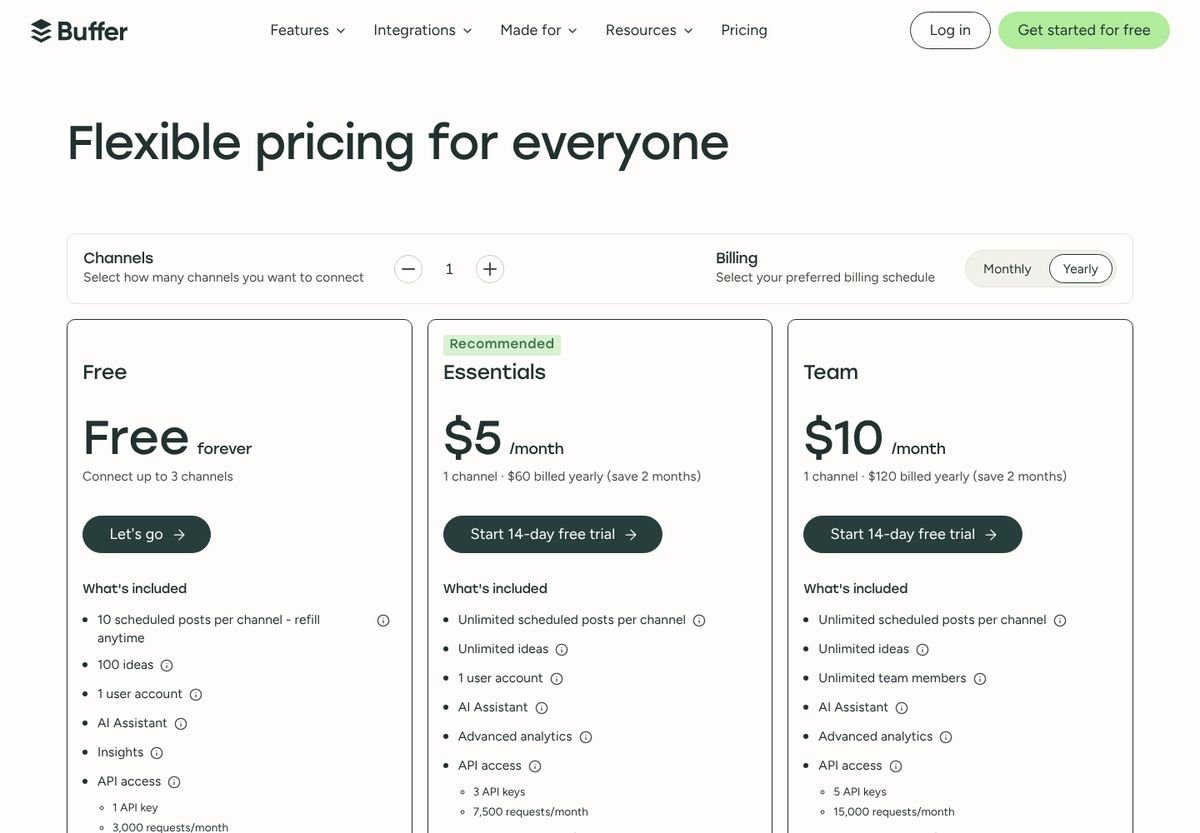
| 9. Buffer Social scheduler | Scheduling only | $5 per channel / month | Free: 3 channels, 10 scheduled posts each | 2.8 | Visit |
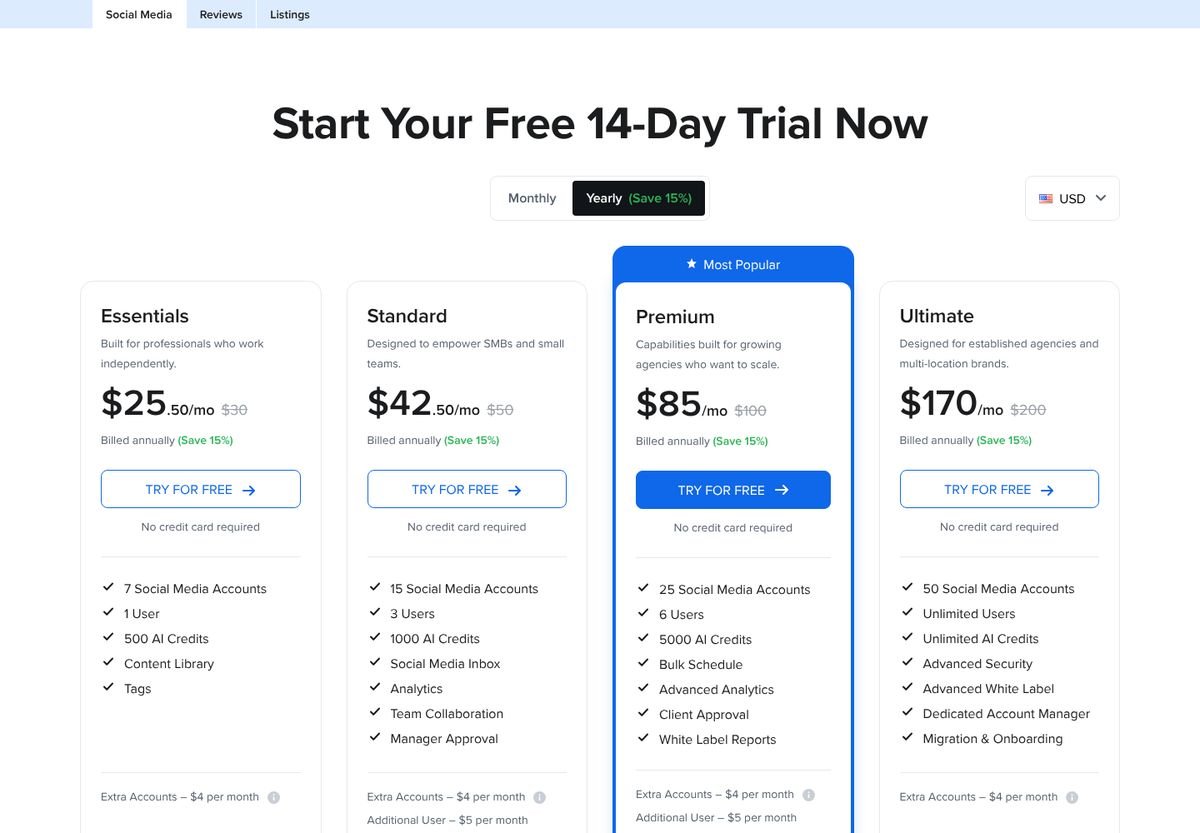
| 10. SocialPilot Social suite | Auto-posts new items | From $25.50 / month | 14-day trial, no card | 2.7 | Visit |
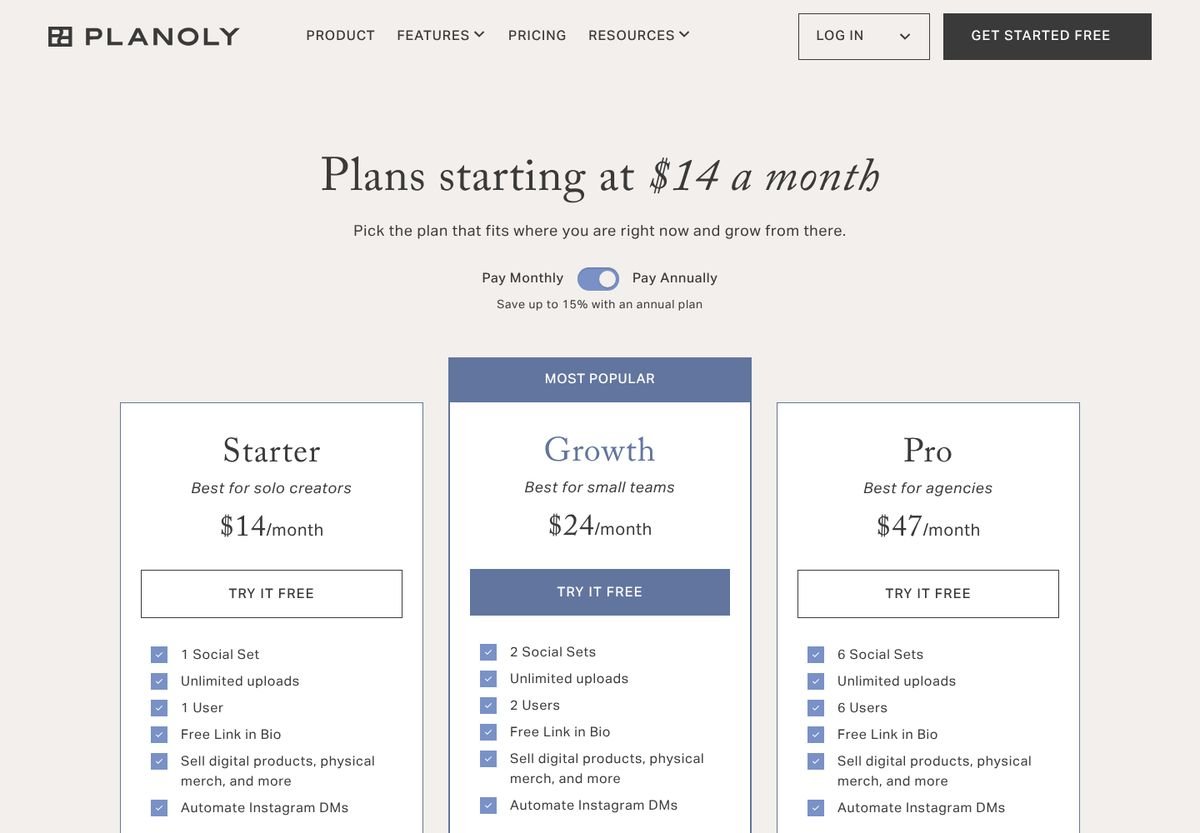
| 11. Planoly Social suite | Scheduling only | From $14 / month | 14-day trial | 2.6 | Visit |
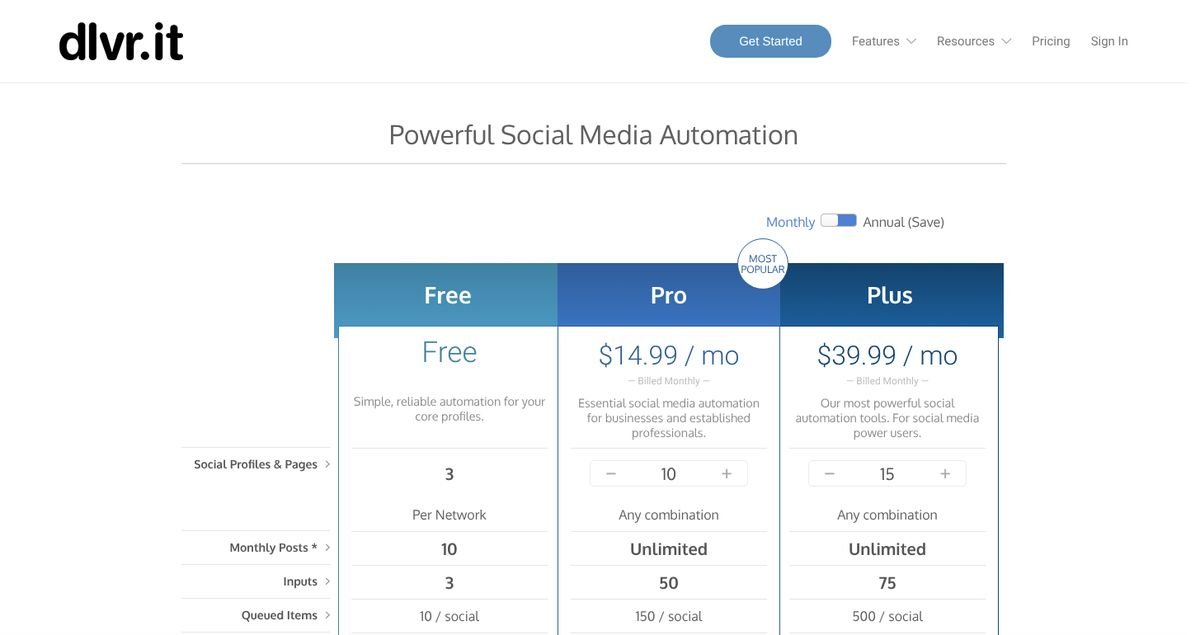
| 12. dlvr.it RSS auto-poster | Auto-posts new items | Pro $14.99 / month | Free plan: 3 profiles, 10 posts a month | 2.6 | Visit |
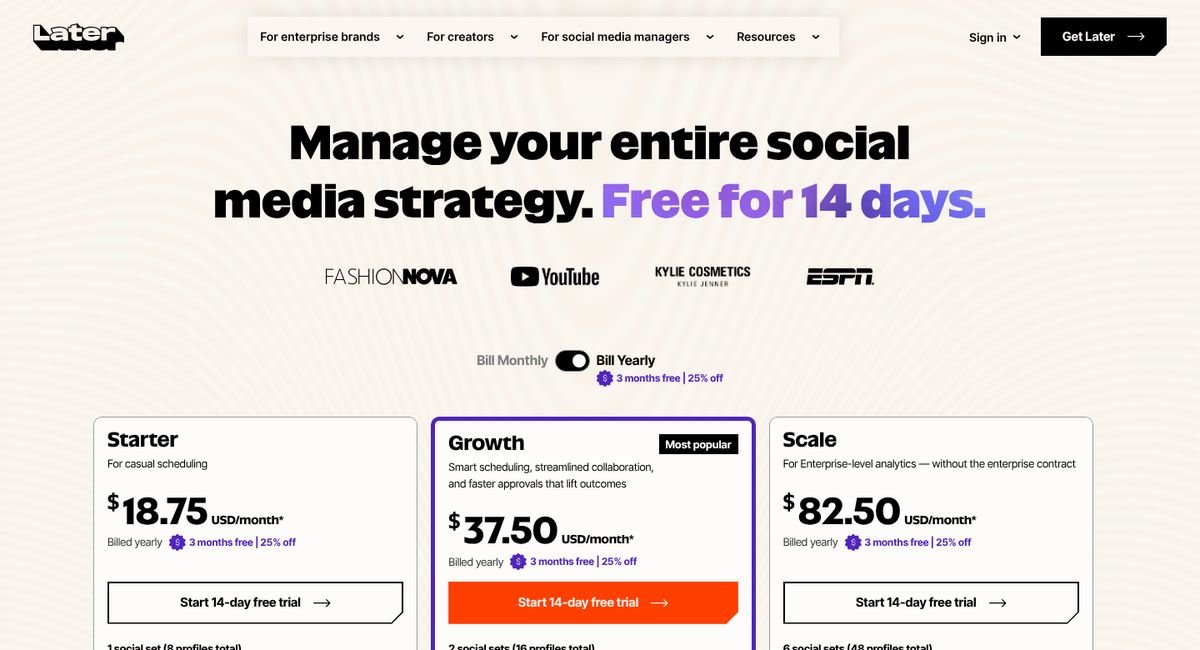
| 13. Later Social suite | Scheduling only | From $18.75 / month | 14-day trial | 2.5 | Visit |
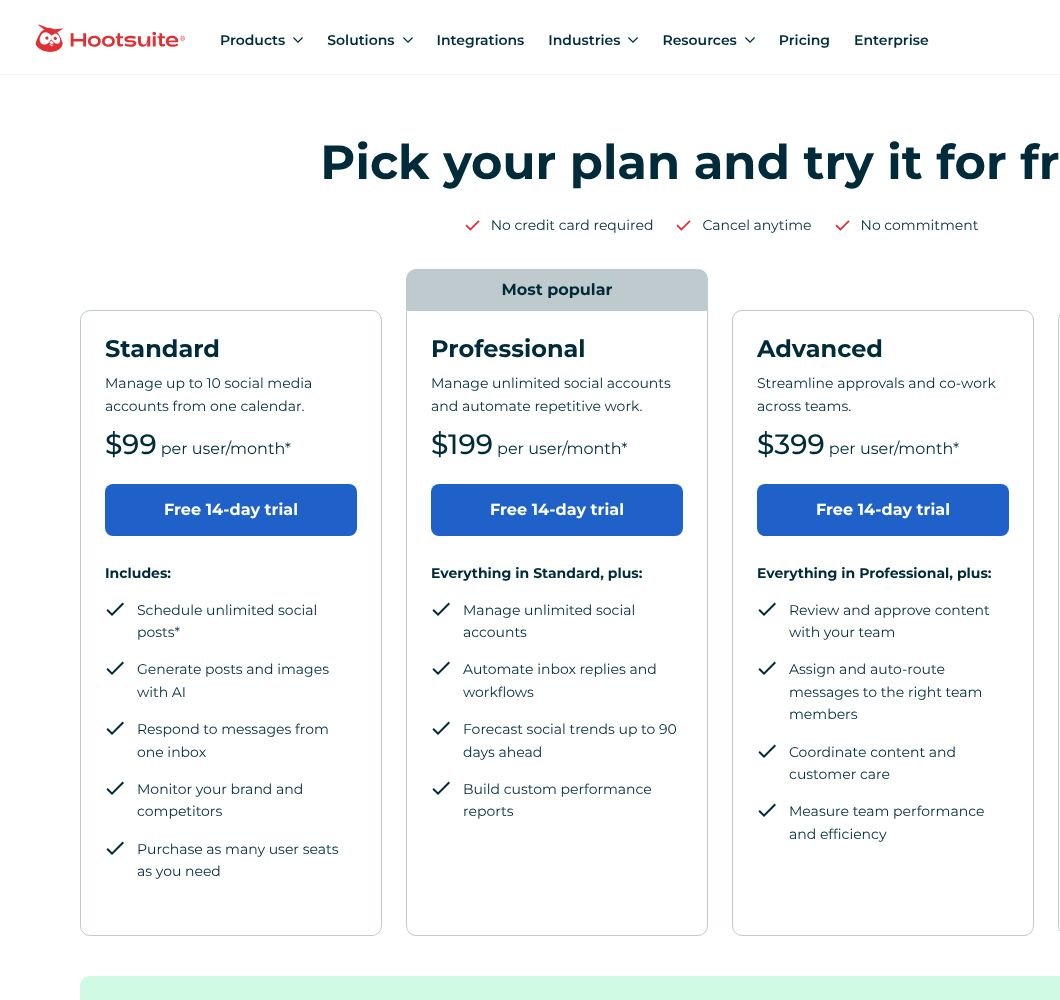
| 14. Hootsuite Enterprise suite | Scheduling only | From $99 per user / month | 14-day trial | 2.2 | Visit |
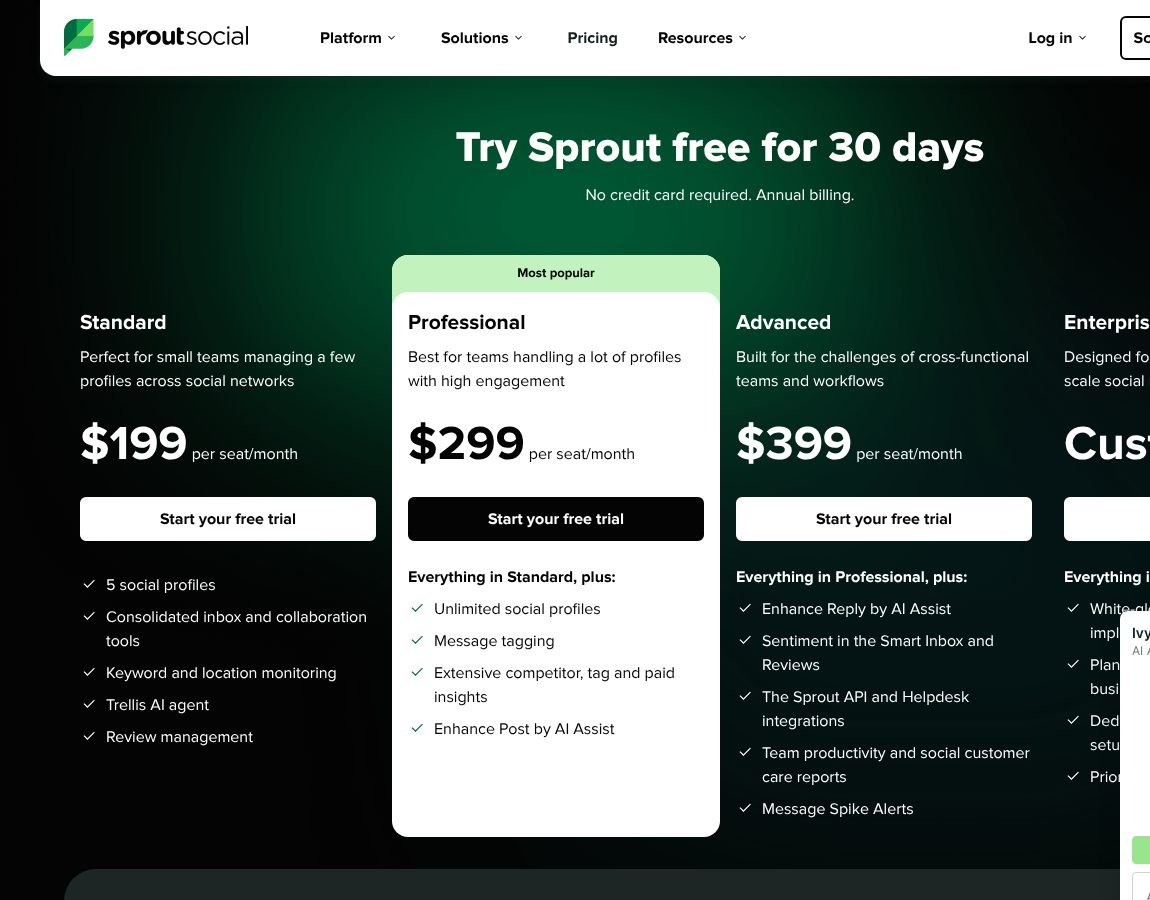
| 15. Sprout Social Enterprise suite | Scheduling only | From $79 per seat / month | 30-day trial | 2.1 | Visit |
Which Pinterest automation tools actually automate?
Most “Pinterest automation” lists mix two kinds of software. A scheduler publishes pins you already made. An automation tool makes them: it reads your pages, writes the text, designs the image and keeps posting. Sorted by what they really do, the 15 tools fall into five groups. Only two make and post pins with no work per pin; six do nothing until you upload a finished pin.
| Level | What the tool does for you | Tools |
|---|---|---|
| Full automation | Finds your pages, writes the text, designs the pin and posts it every day, with no work per pin once it is set up. | SiteToSocial, Pin Generator |
| Partial automation | Creates pins from your site, but you review and schedule them, or need a top plan before it runs on its own. | Tailwind, BlogToPin |
| Auto-posts new items | Posts each new blog post or feed item by itself, with the image and text as they are. Older pages never get pins, and nothing is designed. | Pinterest (built-in), Publer, SocialPilot, dlvr.it |
| Scheduling only | Publishes the pins you designed and wrote, at the times you choose. | Canva, Buffer, Planoly, Later, Hootsuite, Sprout Social |
| Build it yourself | Connects a trigger to Pinterest. You build every step, including where the image and the text come from. | Make / n8n / Zapier |
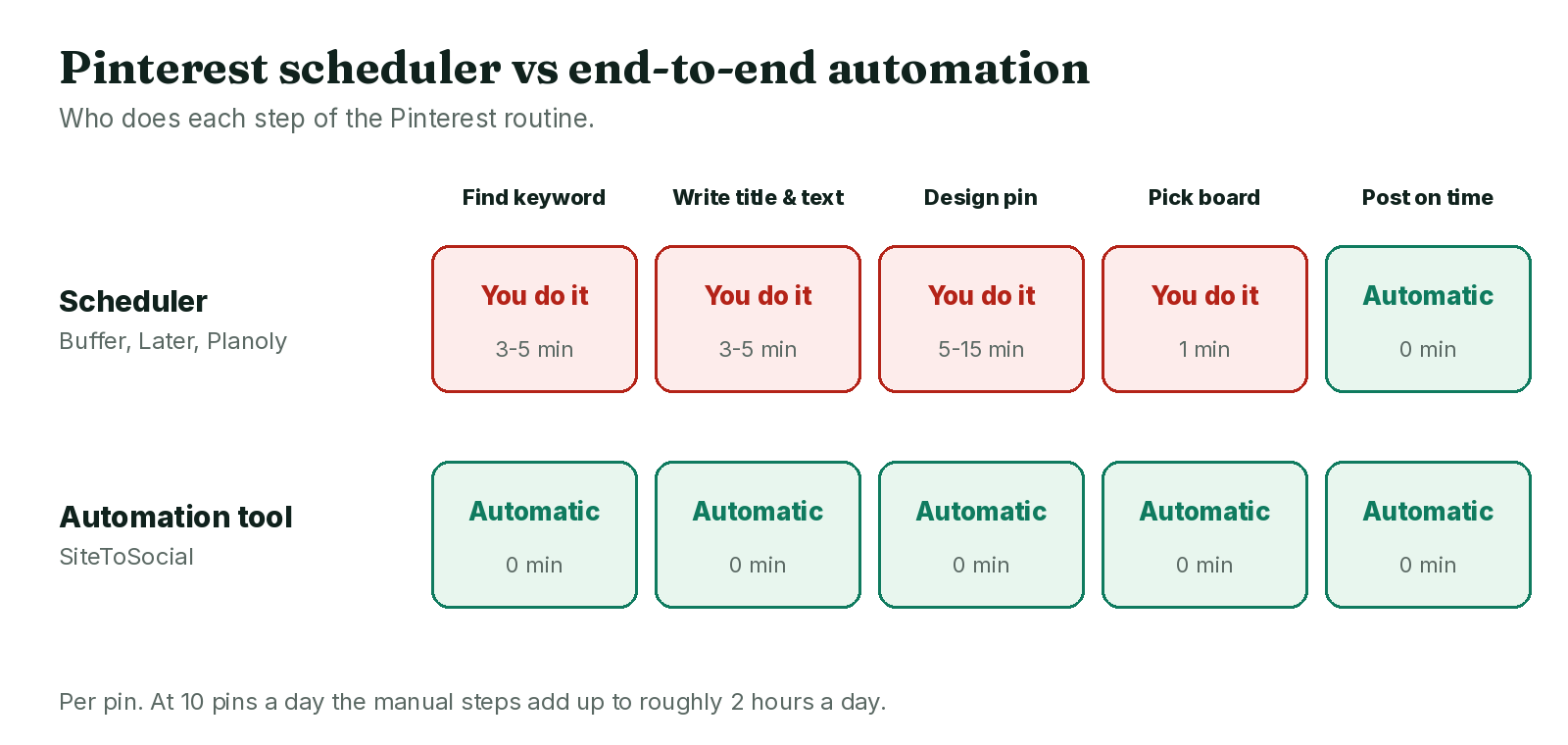
Every tool card below answers the same question, “Does it actually automate Pinterest?”, so you can check the grouping tool by tool. The difference between the groups is hours a week:
| Scheduler | Automation tool | |
|---|---|---|
| Keyword research | You do it | Built in (best tools) |
| Titles and descriptions | You write them | Written for each pin |
| Pin design | You design them | Designed from your pages |
| Posting | Automatic, at times you set | Automatic, spread through the day |
| Your time for 150 pins a month | 25 to 50 hours | Under an hour |
| Examples | Pinterest, Buffer, Publer, Later, Planoly | SiteToSocial, Pin Generator, BlogToPin |
The time row assumes 10 to 20 minutes per pin by hand, which is what designing an image, writing the text and picking a board usually takes. If you enjoy that part, a scheduler is fine, and our best Pinterest scheduler guide compares them in detail.
The 15 tools, ranked and reviewed
Best overall
SiteToSocial
Hands-off pins from your website Automation
Price
$10 per website / month
$9 billed yearly. AI-image plans $29, $39 and $49.
Free option
14-day free trial, no card; 10 free tools
Does it actually automate Pinterest?
Full automation Yes, end to end. SiteToSocial is a Pinterest automation tool that turns every page of your site into a keyword-researched, designed pin and posts it daily, with nothing to do per pin.
Reads your sitemap, picks a keyword for each page from Pinterest search data, writes the title, description and alt text, designs the pin from the page's own photos (or with AI on the higher plans), chooses the board and posts every day through Pinterest's API.
What works
- The whole job happens without you, every day
- Keyword research with Pinterest search data on every plan
- One flat price per website, up to 15 pins a day
- 12-day warm-up for new Pinterest accounts built in
- Writes in 54 languages
What doesn't
- Image pins only: no video or carousel pins
- No drag-and-drop editor for designing pins by hand
- One Pinterest account per website
- AI-image pins cost more ($29 to $49)
- Support by email only
Our take
SiteToSocial is the only tool here whose cheapest plan covers the entire routine, keyword research included. You add a sitemap (or a list of links for Etsy and Medium), connect Pinterest on Pinterest’s own approval screen, and pins start going out: each built on a phrase checked against Pinterest’s search volume, designed from the page’s own photos and spread through the day, at most two a day per page. New accounts get a 12-day warm-up without asking. What you give up is control: there’s no editor for placing every element by hand, no video, and one Pinterest account per website. For a blog or shop that wants fresh pins every day without spending its evenings on them, nothing else here costs less or asks less. Our full SiteToSocial review goes deeper.
Score breakdown, features and integrations
Main features
- Sitemap and link import
- Keyword research
- AI titles, descriptions, alt text
- 24 layouts, 47 palettes
- Smart boards
- Analytics
Works with
- WordPress
- Shopify
- Etsy
- Medium
- Any site with a sitemap
Support
Best for video and catalogs
Pin Generator
Credit-based automation with templates Automation
Price
From $29.99 / month
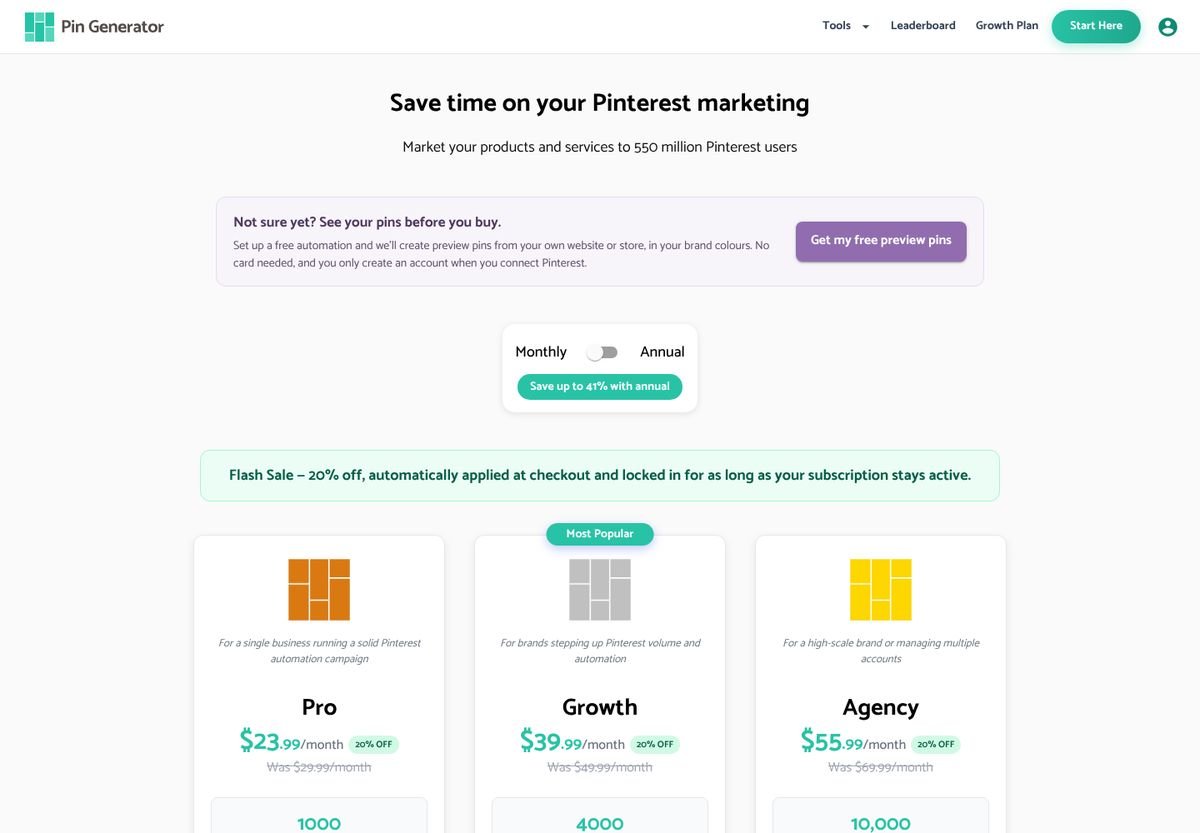
1,000 credits; up to 41% off yearly. A 20% sale was running on 22 Oct 2026.
Free option
Free preview pins, no card
Does it actually automate Pinterest?
Full automation Yes, once you have designed its templates. Pin Generator is a Pinterest automation tool that builds pins from URLs, sitemaps, feeds or catalogs and schedules them, and every pin spends credits.
Scans a URL, sitemap, RSS feed or product catalog and turns it into pins with dynamic templates, AI text and optional AI images, then schedules them with daily caps and posting windows. Every action spends credits.
What works
- The widest feature set here: video pins, catalogs, Canva import
- Dynamic templates you design once
- Product sync for Shopify, Etsy, Amazon and WooCommerce
- Free preview pins before you pay
What doesn't
- Credits add up: AI text, alt text and SEO targeting each cost extra
- AI images cost 12 to 24 credits each
- More settings to learn than a one-click tool
Our take
The most complete toolbox on the list. Automations run from URLs, sitemaps, RSS feeds or product catalogs; dynamic templates keep pins on brand; video pins, Canva import and trend alerts are all there. The catch is credits. A pin with AI text and SEO targeting costs about 3.5 credits, so 450 pins a month need the $49.99 plan, and AI images add 12 to 24 credits each. Worth it for shops with catalogs or anyone who needs video; overkill for a blog that just wants steady image pins. More in our Pin Generator alternatives comparison.
Score breakdown, features and integrations
Main features
- URL, sitemap and RSS automations
- Dynamic templates
- Video pins
- Trend alerts
- Keyword research
- Catalogs
Works with
- WordPress
- Shopify
- Etsy
- Amazon
- WooCommerce
- Canva
Support
Email (priority on Agency)
Best for hands-on pinners
Tailwind
The veteran Pinterest scheduler Scheduler + creation
Price
From $17.99 / month
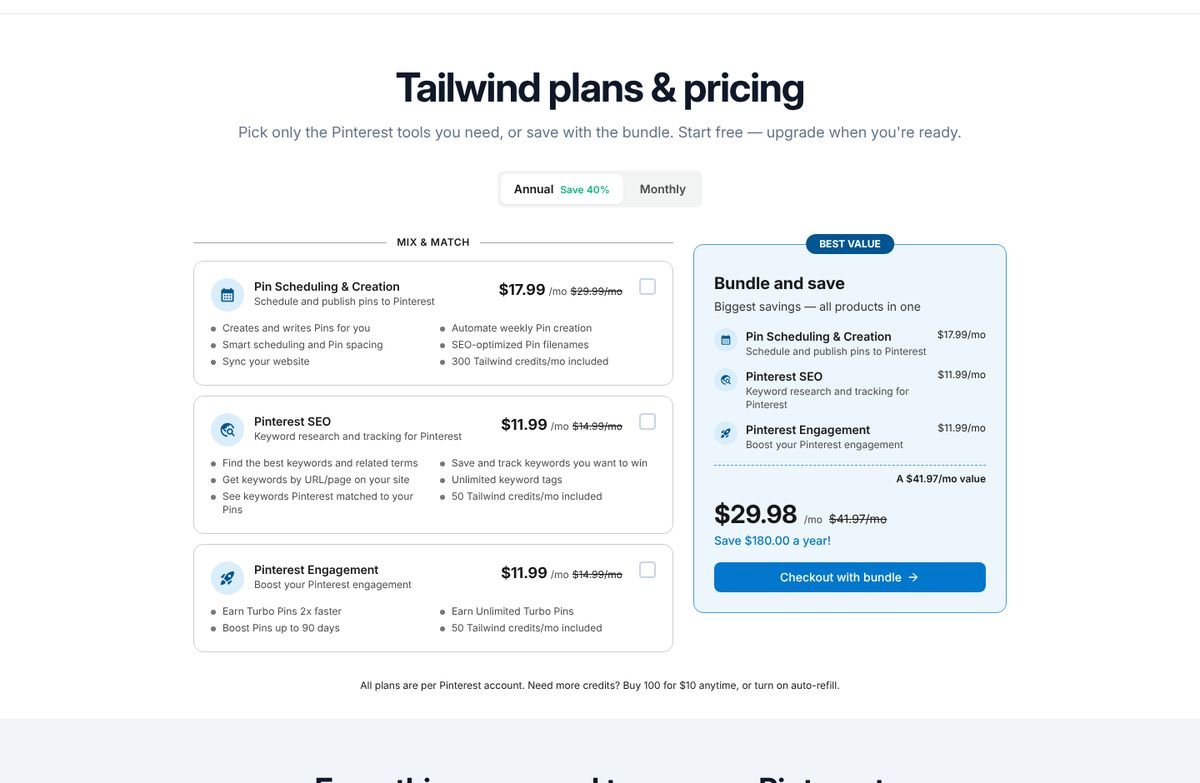
Per Pinterest account, billed yearly ($29.99 monthly). SEO add-on +$11.99; bundle $29.98.
Free option
Free start, no card
Does it actually automate Pinterest?
Partial automation Partly. Tailwind is a Pinterest scheduler that also drafts pins from your website each week with SmartPin, but you review and schedule much of what goes out.
Schedules pins at smart times, creates pins from your website each week with SmartPin and Tailwind Create, and sells keyword research and engagement as separate add-ons. 300 credits a month cover 300 scheduled pins.
What works
- Pinterest partner since 2012 with a long track record
- SmartSchedule picks posting times for your audience
- Design tools and a browser extension
- Keyword research add-on with rank tracking
What doesn't
- Keyword research costs extra
- Credits run out: 300 a month, then $10 per 100
- Priced per Pinterest account
- You still review and approve much of what goes out
Our take
Tailwind has been a Pinterest partner since 2012, and its scheduler is still the most polished place to plan pins by hand. SmartSchedule picks posting times, SmartPin drafts pins from your site each week, and the keyword research is genuinely good. The trouble is how it’s sold: keyword data is a separate $11.99 add-on, credits cover 300 pins a month before $10 top-ups, and everything is priced per Pinterest account. Choose it if you like reviewing each pin before it goes out. Our Tailwind alternatives page compares nine options.
Score breakdown, features and integrations
Main features
- SmartSchedule
- SmartPin
- Tailwind Create
- Ghostwriter AI
- Pinterest SEO add-on
- Browser extension
Works with
- WordPress
- Shopify
- Any website
Support
Email and help center
Best for many accounts
BlogToPin
High-volume AI pins, many accounts Automation
Price
From $25 / month
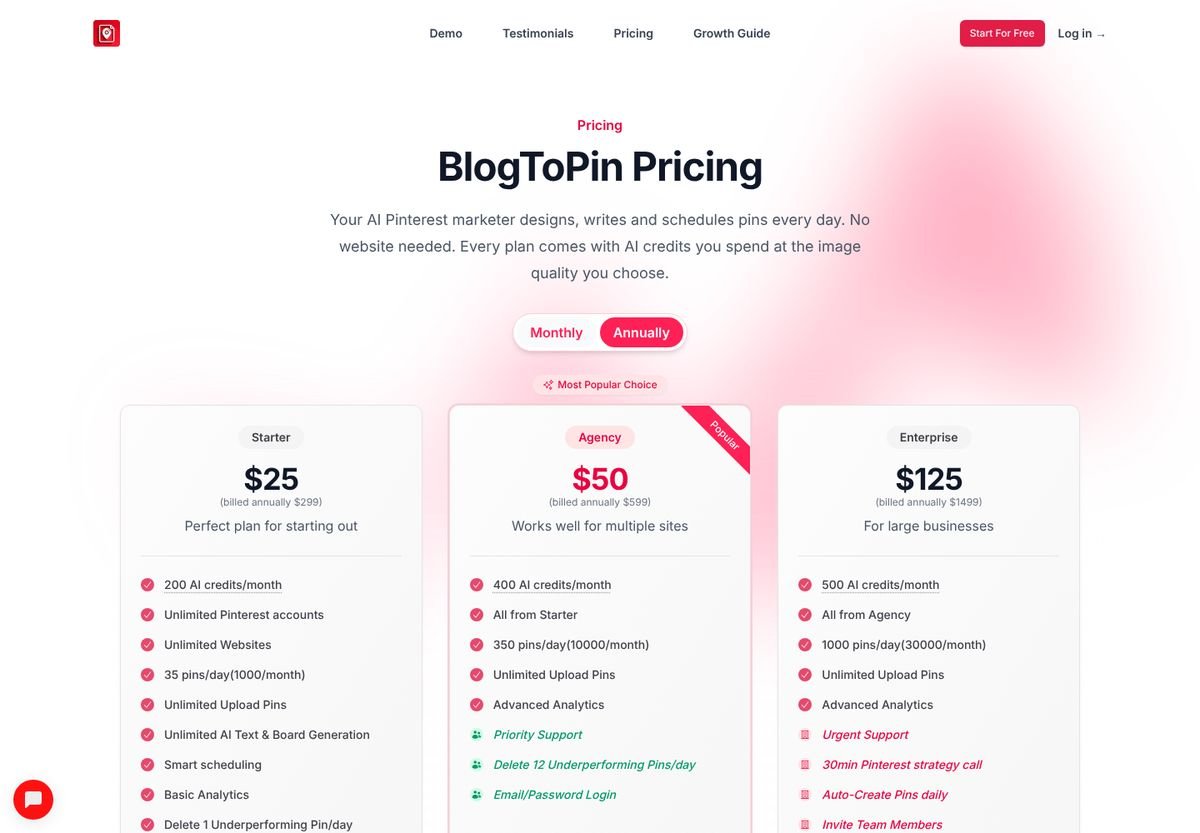
Billed yearly ($299); $39 billed monthly. Daily auto-create only on Enterprise ($125 yearly, $179 monthly).
Free option
Free start
Does it actually automate Pinterest?
Partial automation Partly, on its cheaper plans. BlogToPin is an AI Pinterest tool that writes, designs and schedules pins, but fully automatic daily creation needs the $125-a-month Enterprise plan.
Designs, writes and schedules pins with AI from your pages or uploads, with AI board selection and unlimited Pinterest accounts. Higher plans raise the daily limit to 350 or 1,000 pins and add daily auto-creation.
What works
- Unlimited Pinterest accounts and websites on every plan
- High daily limits for big sites and agencies
- 27 templates, 36 palettes and Canva import
- Removes underperforming pins on a schedule
What doesn't
- Fully automatic daily creation needs the Enterprise plan
- No refunds: its FAQ cites AI costs
- No published Pinterest search-volume data
- High limits make it easy to over-post
Our take
BlogToPin’s appeal is scale: unlimited Pinterest accounts and websites on every plan, and daily limits from 35 to 1,000 pins. Agencies juggling many clients will like that. Two things held its score back. Fully automatic daily pin creation is only on the $125-a-month Enterprise plan, and limits that high make over-posting easy, which is the fastest way to get a new account flagged. Monthly billing is available, at $39 instead of $25. See our BlogToPin alternatives for the trade-offs.
Score breakdown, features and integrations
Main features
- AI pin design
- AI board selection
- Unlimited accounts
- Templates and palettes
- Pin cleanup
- Analytics
Works with
- WordPress
- Shopify
- Etsy
- Any website
Support
Standard; priority on higher plans
Best free option
Pinterest (built-in)
Free scheduler and RSS auto-publish Native
Price
Free
Needs a free business account.
Free option
Free
Does it actually automate Pinterest?
Auto-posts new items Only for new posts. Pinterest's own tools auto-publish each new blog post from your RSS feed and schedule pins you make, but they never create or improve a pin.
Lets you schedule pins up to 30 days ahead from the pin builder, upload up to 200 pins by CSV, and auto-publish pins from your blog's RSS feed once your website is claimed.
What works
- Costs nothing
- Video and carousel pins
- RSS auto-publish from a claimed site
- Trends and Analytics in the same account
What doesn't
- You make every pin and write every word
- RSS pins reuse the post image and text as they are
- No keyword help inside the scheduler
- Schedules only 30 days ahead
Our take
Before paying anyone, use what Pinterest gives you. The built-in scheduler plans pins up to 30 days ahead, CSV upload handles 200 at a time, and RSS auto-publish turns each new blog post into a pin once your website is claimed. None of it creates or improves pins, though: RSS reuses the post’s image and text as they are and never touches older posts. Free and safe, but every good pin is still your work. Setup steps are in our Pinterest business account guide.
Score breakdown, features and integrations
Main features
- Pin scheduler
- RSS auto-publish
- Bulk CSV upload
- Pinterest Trends
- Analytics
Works with
- Any website with RSS
Support
Help center
Cheapest paid scheduler
Publer
Cheap multi-network scheduler with RSS Social scheduler
Price
From $4 per account / month
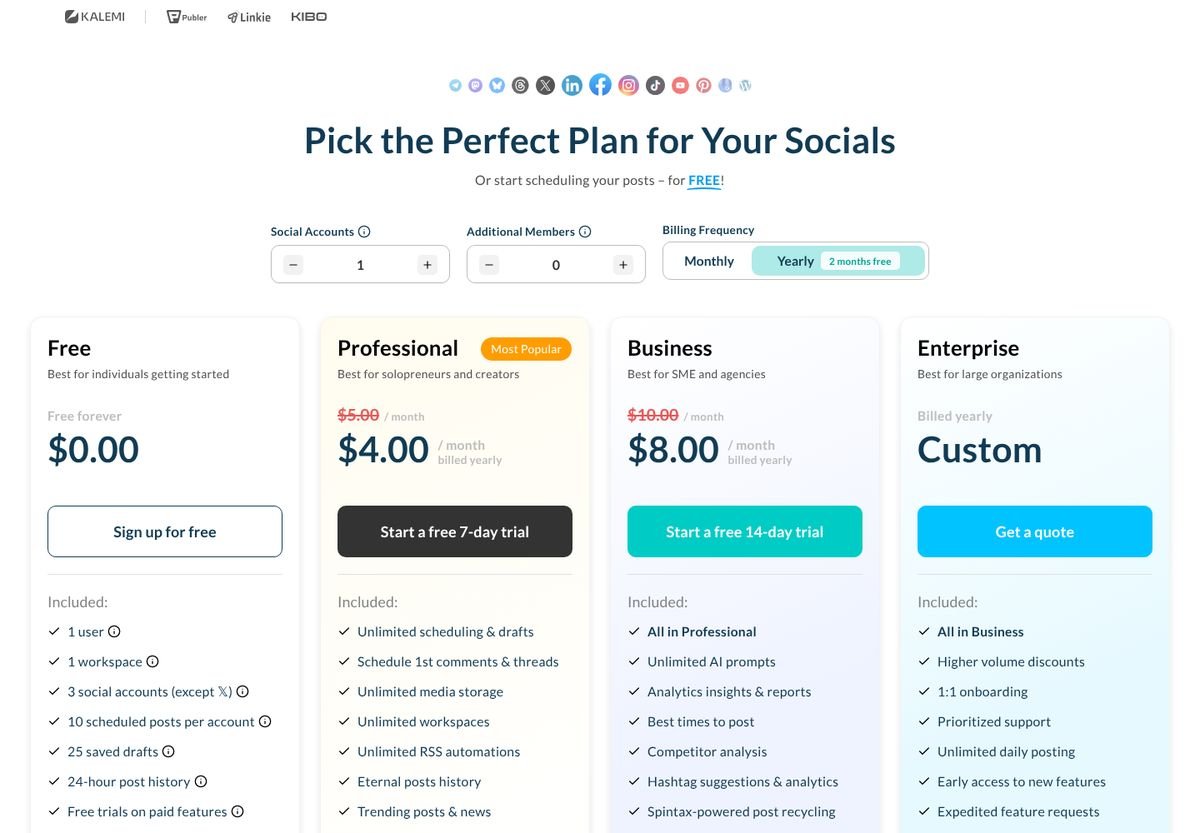
Professional, billed yearly ($5 monthly).
Free option
Free plan: 3 accounts, 10 scheduled posts each
Does it actually automate Pinterest?
Auto-posts new items Only through RSS. Publer is a social media scheduler that can auto-post new feed items to Pinterest; every other pin is yours to design and write.
Schedules posts to Pinterest and a dozen other networks from one calendar, with unlimited RSS automations on paid plans. On the free plan, Pinterest accounts need 100 followers or a claimed website.
What works
- Very low price per account
- Unlimited RSS automations on paid plans
- Free plan for trying it
- Best-time suggestions on Business
What doesn't
- Pinterest is one network of many
- You design pins elsewhere
- No Pinterest keyword data
Our take
At $4 a month per account (billed yearly), Publer is the cheapest paid way to schedule pins, and its paid plans include unlimited RSS automations. It’s a general social scheduler, so Pinterest is one tab among a dozen and you design pins elsewhere. On the free plan, Pinterest accounts need 100 followers or a claimed website before they can connect.
Score breakdown, features and integrations
Main features
- Calendar
- RSS automations
- AI assist
- Analytics (Business)
Works with
- TikTok
- WordPress
Support
Chat and email
Best for designing pins
Canva
Design pins, then schedule them Design + scheduling
Price
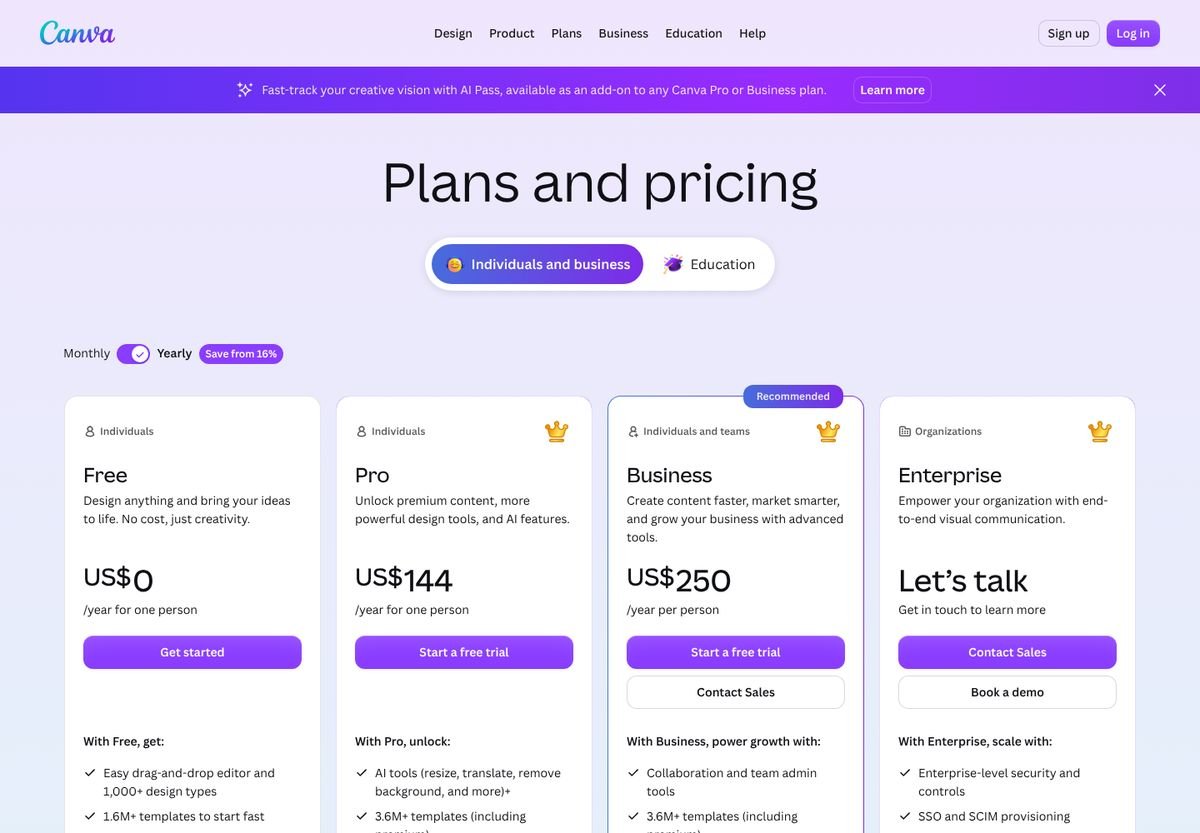
Pro $144 / year
About $12 a month; scheduling is a Pro feature.
Free option
Free plan (no scheduling)
Does it actually automate Pinterest?
Scheduling only No. Canva is a design tool that can schedule a finished pin to one board; every pin is designed, written and scheduled by you.
The design tool most pinners already use: thousands of Pinterest templates, brand kits and AI resizing, plus a Content Planner that schedules a finished design to one Pinterest board.
What works
- Best design tools and templates
- Brand kits keep pins consistent
- Scheduling included in Pro
- Free plan for design
What doesn't
- Every pin designed and written by you
- One platform per scheduled design
- No keyword research or automation
Our take
Most pinners already open Canva every week, and Pro ($144 a year) includes scheduling a finished design straight to a Pinterest board. Nothing beats it for templates and brand kits. It is a design tool with a calendar, not automation: every pin is designed, written and scheduled by you, one platform per design.
Score breakdown, features and integrations
Main features
- Pinterest templates
- Brand kits
- AI tools
- Content Planner
Works with
Support
Help center; priority on Business
Best for developers
Make / n8n / Zapier
Build your own automation Workflow builder
Price
Free tiers; paid by usage
n8n can be self-hosted for free.
Free option
Free tiers
Does it actually automate Pinterest?
Build it yourself As far as you build it. Make, n8n and Zapier are workflow builders that connect a trigger to Pinterest; the image, the text and the pacing are up to you.
Workflow tools that connect a trigger (a new post, a spreadsheet row) to Pinterest. Make and Zapier have Pinterest modules; n8n uses the Pinterest API through an HTTP node. You build and maintain every step.
What works
- Unlimited flexibility
- Connects Pinterest to any app
- Cheap at low volume
What doesn't
- You build, test and fix the workflow
- Images and text still come from somewhere else
- Easy to break when an API changes
Our take
Make and Zapier have Pinterest modules; n8n reaches Pinterest through its API. With any of them you can wire a new blog post, a spreadsheet row or a product feed to a pin. You also own every step: the image, the text, the pacing and fixing it when something changes. Our Make and n8n guide shows a working setup.
Score breakdown, features and integrations
Main features
- Triggers
- Pinterest modules or API
- Any app integration
Works with
- Thousands of apps
Support
Docs and community
Easiest to learn
Buffer
Simple scheduling for many networks Social scheduler
Price
$5 per channel / month
Essentials, billed yearly ($60).
Free option
Free: 3 channels, 10 scheduled posts each
Does it actually automate Pinterest?
Scheduling only No. Buffer is a social media scheduler that posts the pins you queue; it creates nothing from your website.
Queues posts for Pinterest alongside other networks, with an AI assistant for captions and basic insights. You bring the pin image and text.
What works
- Very easy to use
- Generous free plan
- Low price per channel
- Clean calendar and queue
What doesn't
- No board sections or secret boards
- No Pinterest keyword data
- No pin creation from your website
Our take
Buffer is the friendliest scheduler here, and its free plan (3 channels, 10 scheduled posts each) is enough to try Pinterest scheduling properly. It treats Pinterest like any other network, though: no board sections, no secret boards and no keyword help. Details in our Buffer for Pinterest comparison.
Score breakdown, features and integrations
Main features
- Queue and calendar
- AI assistant
- Insights
- Browser extension
Works with
- TikTok
- Threads
Support
Best for agencies on a budget
SocialPilot
Agency scheduler with bulk upload Social suite
Price
From $25.50 / month
Essentials, billed yearly ($30 monthly), 7 accounts.
Free option
14-day trial, no card
Does it actually automate Pinterest?
Auto-posts new items Only for feed items and uploads. SocialPilot is an agency social media scheduler that can post new RSS items and bulk-schedule CSVs on Premium, but it creates no pins.
Schedules pins to several boards at once, imports from RSS feeds and, on Premium, bulk-schedules up to 500 posts from a CSV. Built for agencies managing many clients.
What works
- Post to several boards at once
- RSS feeds on every plan
- Bulk CSV scheduling on Premium
- Client approvals and white-label reports
What doesn't
- Bulk scheduling only from $85 a month
- No Pinterest keyword data
- You design every pin
Our take
SocialPilot posts to several boards at once, pulls from RSS feeds on every plan and adds client approvals. Bulk scheduling from a CSV, the feature agencies want most, starts on the $85 Premium plan. Pins are still yours to make.
Score breakdown, features and integrations
Main features
- Board selection
- RSS
- Bulk CSV
- Approvals
- Reports
Works with
- TikTok
- Canva
Support
Chat and email
Planoly
Grid planner for creators Social suite
Price
From $14 / month
Starter: 1 social set, 1 user.
Free option
14-day trial
Does it actually automate Pinterest?
Scheduling only No. Planoly is a content planner for creators that auto-posts the pins you upload; it makes none itself.
A content calendar for creators that auto-posts to Pinterest among other networks, with AI caption ideas, a link-in-bio store and DM automation for Instagram.
What works
- Unlimited uploads on every plan
- Creator store and link in bio
- Simple, friendly planner
What doesn't
- Built around Instagram
- No Pinterest-specific features
- You make every pin
Our take
Planoly is a creator planner first: grid previews, a link-in-bio store and Instagram DM automation. Pinterest auto-posting is included with unlimited uploads from $14 a month, but there’s nothing Pinterest-specific beyond the calendar.
Score breakdown, features and integrations
Main features
- Calendar
- AI ideas
- Link in bio store
- Media library
Works with
- TikTok
- YouTube
Support
dlvr.it
Posts your RSS feed to Pinterest RSS auto-poster
Price
Pro $14.99 / month
Monthly; Plus $39.99. Free plan with 3 profiles.
Free option
Free plan: 3 profiles, 10 posts a month
Does it actually automate Pinterest?
Auto-posts new items Only for new articles. dlvr.it is an RSS auto-poster that pins each new item with its feed image and text; older posts and pin design are left out.
Watches your RSS feeds and posts each new item to chosen Pinterest boards and other networks, with filters, frequency limits, auto-hashtags and short links.
What works
- Set once, posts every new article
- Filters and posting limits
- Free plan to try it
What doesn't
- Posts new items only: old posts never get pins
- Uses the feed image and text as they are
- No design or keyword work
Our take
dlvr.it watches your RSS feed and posts each new article to the boards you choose, with filters and frequency limits. It’s set-and-forget for new content only: the 300 posts already on your blog never get a pin, and each pin is the feed’s image and text as they are. Our dlvr.it alternatives page covers the options.
Score breakdown, features and integrations
Main features
- RSS to Pinterest
- Filters
- Auto-hashtags
- Short links
Works with
- Any RSS feed
Support
Help center and email
Later
Visual planner, Instagram first Social suite
Price
From $18.75 / month
Starter, billed yearly; 30 posts per profile a month.
Free option
14-day trial
Does it actually automate Pinterest?
Scheduling only No. Later is a visual social media planner built around Instagram; it publishes the pins you upload.
Plans posts on a visual calendar for one social set (one profile on each network, Pinterest included), with link in bio, analytics and AI credits.
What works
- Polished visual calendar
- Strong Instagram and TikTok tools
- Media library and link in bio
What doesn't
- Starter allows 30 posts per profile a month: one pin a day
- Pinterest is a secondary network
- No pin creation or keyword data
Our take
Later is a polished visual planner built around Instagram and TikTok. For Pinterest, the Starter plan’s 30 posts per profile a month works out to one pin a day; daily pinning really starts on Growth at $37.50.
Score breakdown, features and integrations
Main features
- Visual calendar
- Best time to post
- Link in bio
- Analytics
Works with
- TikTok
- YouTube
Support
Email; priority on Scale
Hootsuite
Social suite for big teams Enterprise suite
Price
From $99 per user / month
Standard, billed yearly; 10 social accounts.
Free option
14-day trial
Does it actually automate Pinterest?
Scheduling only No. Hootsuite is an enterprise social media suite that schedules the pins you upload alongside every other network.
Schedules pins to one or more boards from the same calendar as every other network, with approvals, a shared inbox, listening and reporting for teams.
What works
- Pins to several boards at once
- Approvals and team workflows
- Listening and reporting
What doesn't
- $99 per user a month
- Pinterest is one channel among many
- No pin creation or keyword data
Our take
Hootsuite pins to several boards at once and wraps it in approvals, inbox and listening for big teams. At $99 per user a month for the Standard plan, it only makes sense if you already run every other network through it.
Score breakdown, features and integrations
Main features
- Calendar
- Approvals
- Inbox
- Listening
- Analytics
Works with
- TikTok
- YouTube
Support
Chat and email
Sprout Social
Premium suite with Pinterest reports Enterprise suite
Price
From $79 per seat / month
Essentials, billed yearly; Standard $199.
Free option
30-day trial
Does it actually automate Pinterest?
Scheduling only No. Sprout Social is an enterprise social suite that schedules and reports on pins; it doesn't create them.
Schedules and queues pins (and creates boards) from its compose window, previews them, and reports on Pinterest performance next to every other network.
What works
- Pinterest performance report
- Polished compose and calendar
- Strong team and inbox tools
What doesn't
- Expensive per seat
- No pin creation or keyword data
- Overkill for one website
Our take
Sprout Social has a good Pinterest performance report and a clean compose window that can create boards as you schedule. It starts at $79 per seat a month (Essentials, yearly) and does nothing to create pins, so for Pinterest alone it’s the most expensive way to do the same scheduling.
Score breakdown, features and integrations
Main features
- Compose and queue
- Board creation
- Pinterest report
- Inbox
Works with
- TikTok
- YouTube
Support
Chat and email
How we score Pinterest tools
Every score on this page comes from things you can check. For each tool we read its pricing page (screenshots further down, all taken on 22 October 2026), its feature pages and its help center, and noted the published limits: pins a day, credits, accounts, what each plan includes. We did not buy a year of every plan, so we don’t claim results we haven’t measured, like “2x more clicks”. Where a feature couldn’t be confirmed, it isn’t counted.
Each tool gets 1 to 5 points on five criteria. The overall score is the weighted average, calculated from those numbers rather than chosen afterwards, which is why a tool can’t come first just because we like it.
- 30%Automation
How much of the daily job the tool does without you: finding pages, writing, designing, choosing boards and posting.
- 20%Pinterest SEO
Whether pins are built on keywords checked against Pinterest search data, inside the tool and at no extra cost.
- 20%Value
What one website posting 5 to 15 fresh pins a day pays per month, with every feature needed to do it.
- 15%Account safety
Official API or Pinterest partner status, sensible pacing and help for new accounts.
- 15%Formats & control
Video, carousels, templates, a design editor and manual control over each pin.
Two things the weights reflect on purpose. Automation counts most, because the time spent making pins is the real cost of Pinterest. Formats and control count too, which is where SiteToSocial loses points: it scores 3 of 5 there, below Pin Generator, Tailwind and Canva.
The full scorecard
Click a tool’s name to jump to its review. Open “Score breakdown” on any card for the reason behind each number.
| Tool | Automation 30% | Pinterest SEO 20% | Value 20% | Account safety 15% | Formats & control 15% | Overall |
|---|---|---|---|---|---|---|
| SiteToSocial | 5.0 | 5.0 | 5.0 | 5.0 | 3.0 | 4.7 |
| Pin Generator | 4.5 | 3.5 | 3.0 | 4.0 | 5.0 | 4.0 |
| Tailwind | 3.5 | 4.0 | 3.0 | 5.0 | 4.5 | 3.9 |
| BlogToPin | 4.0 | 3.0 | 3.5 | 3.5 | 3.5 | 3.6 |
| Pinterest (built-in) | 2.0 | 2.5 | 5.0 | 5.0 | 3.5 | 3.4 |
| Publer | 2.0 | 1.0 | 4.5 | 4.5 | 3.5 | 2.9 |
| Canva | 1.0 | 1.0 | 4.0 | 5.0 | 5.0 | 2.8 |
| Make / n8n / Zapier | 3.0 | 1.0 | 3.5 | 3.5 | 3.0 | 2.8 |
| Buffer | 1.5 | 1.0 | 4.5 | 5.0 | 3.0 | 2.8 |
| SocialPilot | 2.0 | 1.0 | 3.0 | 5.0 | 3.5 | 2.7 |
| Planoly | 1.5 | 1.0 | 3.5 | 5.0 | 3.0 | 2.6 |
| dlvr.it | 2.5 | 1.0 | 3.5 | 4.0 | 2.0 | 2.6 |
| Later | 1.5 | 1.0 | 3.0 | 5.0 | 3.5 | 2.5 |
| Hootsuite | 1.5 | 1.0 | 1.5 | 5.0 | 3.5 | 2.2 |
| Sprout Social | 1.5 | 1.0 | 1.0 | 5.0 | 3.5 | 2.1 |
What it costs to post every day
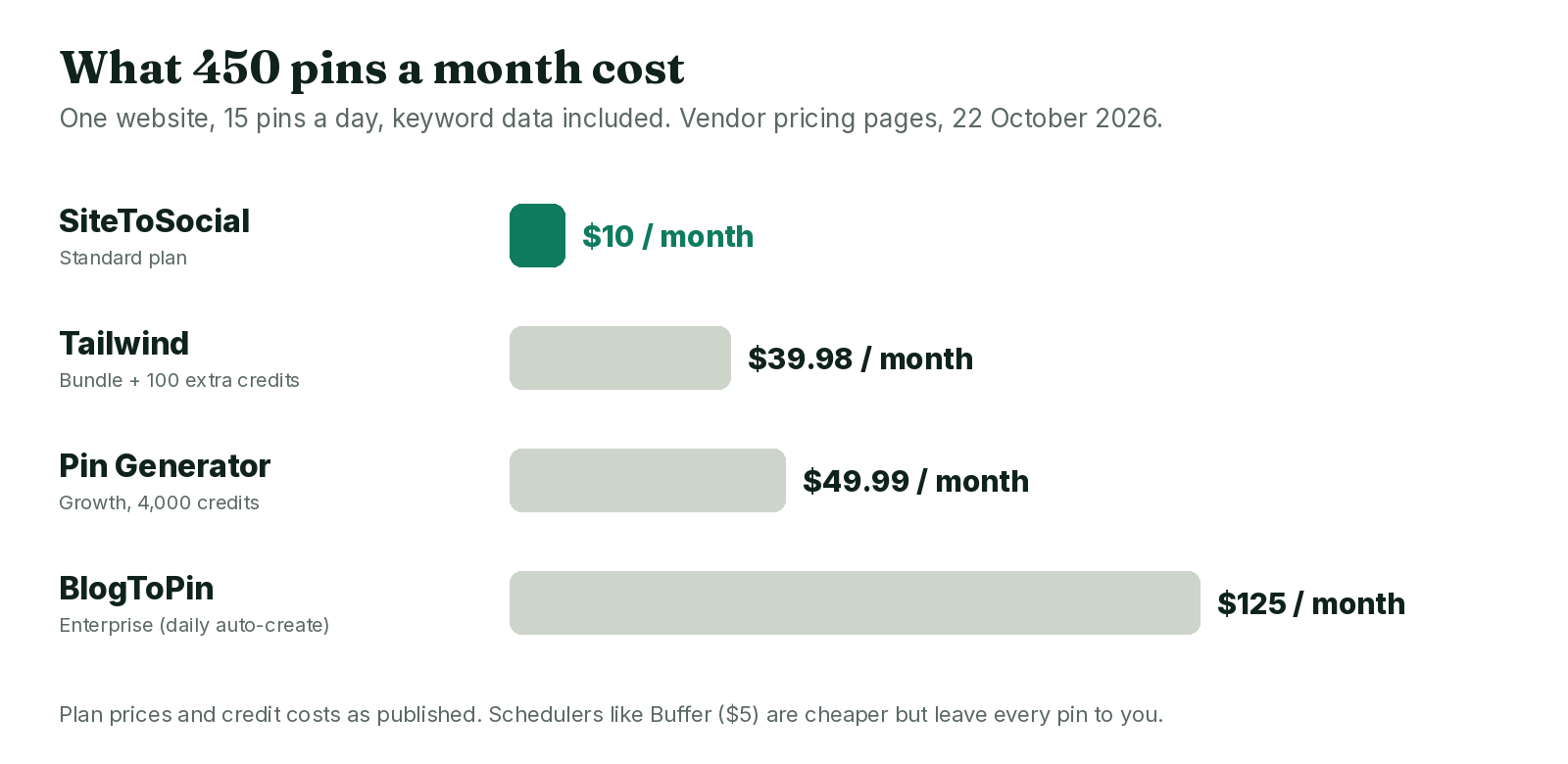
Sticker prices don’t compare well: some tools charge per website, some per Pinterest account, some per credit. So we calculated what one website pays for 150 pins a month (5 a day) and 450 (15 a day), with Pinterest keyword data included wherever the tool sells it.
| Tool | 150 pins a month | 450 pins a month | Who makes the pins |
|---|---|---|---|
| SiteToSocial | $10 | $10 | The tool |
| Pin Generator | $29.99 (525 credits) | $49.99 (1,575 credits) | The tool, from your templates |
| Tailwind | $29.98 (bundle, 400 credits) | $39.98 (bundle + 100 credits) | You, with SmartPin drafts |
| BlogToPin | $125 (daily auto-create) | $125 | The tool, on Enterprise |
| Pinterest built-in | $0 | $0 | You |
| Publer | $4 | $4 | You |
| Buffer | $5 | $5 | You |
| Later | $37.50 (Growth) | $82.50 (Scale) | You |
Yearly prices where the vendor shows them. Pin Generator’s credits assume AI text (0.5) and SEO targeting (2) on top of scheduling (1) for every pin; it advertises up to 41% off on yearly plans. Tailwind’s bundle includes 300 + 50 + 50 credits. The schedulers look cheap until you add the 25 to 150 hours of pin-making they leave to you.
Why SiteToSocial ranks first, and where it doesn’t
It wins on the three criteria that carry half the weight, and you can check each reason yourself:
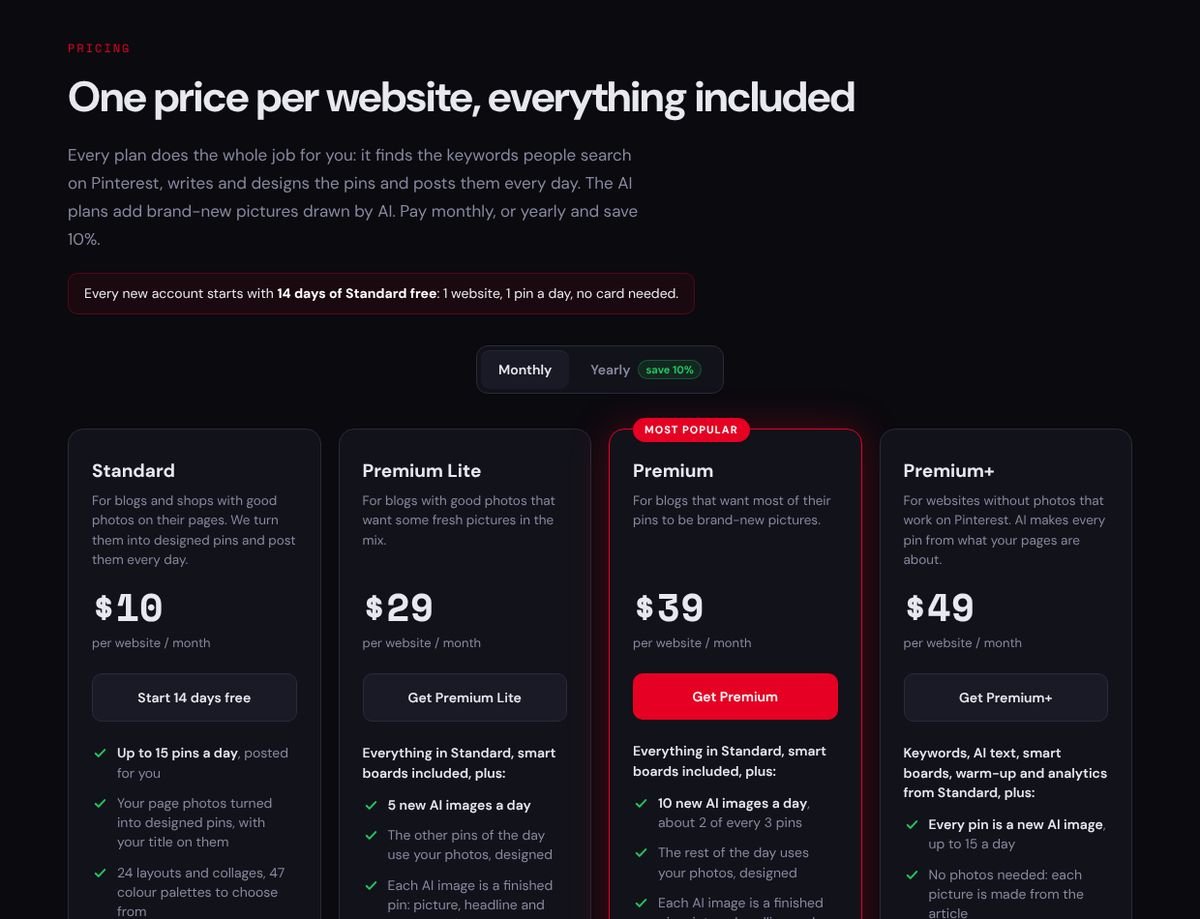
- Keyword research is in the cheapest plan. Its $10 Standard plan lists “keyword research with real Pinterest search data” (see its pricing page below). Tailwind sells keyword data as an $11.99 add-on, and Pin Generator charges 2 credits per pin for SEO targeting.
- One flat price per website. Up to 15 pins a day for $10, whatever the volume. At 450 pins a month that’s about 2 cents a pin, against roughly 9 to 28 cents for the other automation tools in the cost table.
- Pacing is built in. Every page gets a pin before any page gets its next one, at most two a day per page, and new accounts warm up over 12 days. High-limit tools leave that discipline to you. Our warm-up guide explains why it matters.
- It writes in 54 languages and checks keywords with Pinterest Trends in 16 of them, which matters for sites outside English; see Pinterest automation in other languages.
Where it doesn’t win, and what to choose instead:
| If you need | Choose |
|---|---|
| Video or carousel pins | Pin Generator |
| To design every pin by hand | Canva plus a scheduler, or Tailwind |
| Many Pinterest accounts for one site | BlogToPin |
| Instagram and TikTok in the same calendar | Publer, Buffer or Later |
| To spend nothing | Pinterest’s own scheduler |
How to choose the right tool for you
- A blog or shop that wants traffic, not a new hobby: an automation tool. SiteToSocial for the price, Pin Generator if you need video.
- You love designing pins: Canva for the design, Tailwind or Publer for the schedule.
- An agency with many clients: BlogToPin for volume, SocialPilot for approvals and reports.
- Pinterest is one channel among many: Buffer or Publer; Hootsuite and Sprout Social only if your team already lives in them.
- A brand-new Pinterest account: whatever you choose, start slowly. Read is Pinterest automation safe? first.
Can you automate Pinterest for free?
Partly. Pinterest’s scheduler and RSS auto-publish are free and safe, and Buffer and Publer have free plans that schedule a few pins. None of them create pins. For the research and writing, free tools help: SiteToSocial offers ten without signing up, from a keyword tool to a pin maker, and our free Pinterest tools guide compares them with the alternatives. Paid automation starts at $10 a month, with a 14-day free trial on SiteToSocial.
The pricing pages we checked
These are the screenshots behind every price on this page, taken on 22 October 2026. Prices change; if one has moved, the vendor’s page wins, and we’d like to hear about it through our contact page.
Frequently asked questions
What is the best Pinterest automation tool in 2026?
SiteToSocial scored highest in our comparison of 15 tools (4.7 out of 5). It is the only one whose cheapest plan, $10 per website a month, covers the whole job: keyword research with Pinterest search data, AI-written text, designed pins and daily posting. Pin Generator (4.0) is the better pick for video pins and product catalogs, and Tailwind (3.9) for people who want to review every pin.
What does Pinterest automation actually mean?
Pinterest automation means software doing the repetitive Pinterest work for you: choosing which pages to promote, writing pin titles and descriptions, designing the image, picking a board and posting on a schedule through Pinterest's official API. A tool that only posts pins you made yourself is a scheduler, not automation.
Which Pinterest automation tools actually automate, and which just schedule?
Of the 15 tools we compared, only SiteToSocial and Pin Generator create and post pins from your website with no work per pin (Pin Generator once you have designed its templates). Tailwind and BlogToPin automate part of the job. Pinterest's own RSS auto-publish, Publer, SocialPilot and dlvr.it auto-post new feed items as they are. Buffer, Later, Planoly, Canva, Hootsuite and Sprout Social only schedule pins you make.
What is the difference between a Pinterest scheduler and an automation tool?
A scheduler such as Buffer, Later or Pinterest's own scheduler publishes pins you have already designed and written. An automation tool such as SiteToSocial, Pin Generator or BlogToPin also makes the pins from your website: it picks the pages, writes the text, designs the image and keeps posting without you.
Can a Pinterest automation tool create pins for me?
Yes, but only a few do. SiteToSocial writes the text and designs each pin from the page's own photos, or with AI images on its higher plans. Pin Generator fills templates you design, and BlogToPin and Tailwind's SmartPin draft pins with AI. Buffer, Later, Planoly, Hootsuite and Sprout Social post only what you upload.
Is Pinterest automation allowed, or against Pinterest's rules?
Yes, when they post through Pinterest's official API, as every tool in our ranking does. You approve access on Pinterest's own screen and the tool never sees your password. What gets accounts in trouble is spammy behavior: bursts of near-identical pins or a brand-new account posting heavily on day one.
Is there a free Pinterest automation tool?
Pinterest's own tools are free: its scheduler plans pins up to 30 days ahead and RSS auto-publish turns new blog posts into pins. They do not create or improve pins for you. Paid automation starts at $10 a month per website with SiteToSocial, which also has a 14-day free trial without a card.
How much does Pinterest automation cost?
For one website posting 15 fresh pins a day with keyword data included, we calculated about $10 a month with SiteToSocial, about $40 with Tailwind (bundle plus one credit pack) and $49.99 with Pin Generator. BlogToPin's fully automatic daily creation is on its $125-a-month Enterprise plan.
How much time does Pinterest automation save?
With a scheduler you still research, write and design every pin, which usually takes 10 to 20 minutes each: 25 to 50 hours for 150 pins a month. A full automation tool takes under an hour to set up, then occasional checks of what went out. Feed-based tools like dlvr.it save the posting step only.
Can I automate Pinterest for several websites or accounts?
Yes. SiteToSocial charges per website ($10 each), with one Pinterest account per site. BlogToPin includes unlimited Pinterest accounts and websites on every plan, Tailwind prices each Pinterest account separately, and agency schedulers like SocialPilot add client approvals and reports.
Which Pinterest automation tool is best for bloggers?
For a blog that wants fresh pins for every post, old and new, SiteToSocial is our pick: it reads the sitemap, so the archive gets pins too, not just new posts. Pinterest's RSS auto-publish and dlvr.it cover new posts only. Bloggers who enjoy designing pins should pair Canva with Tailwind.
How do you score Pinterest tools?
Each tool gets 1 to 5 points on five criteria: automation (30%), Pinterest SEO (20%), value (20%), account safety (15%) and formats and control (15%). The overall score is the weighted average, calculated from those numbers. Prices come from each vendor's pricing page, checked on 22 October 2026.
Which Pinterest automation tool is best for Etsy and Shopify?
For shops that want fresh pins from their product pages every day, SiteToSocial is our pick: its $10 Standard plan covers product pages and uses the real product photos. Shops that need catalog syncing or video should look at Pin Generator.